LABS 01–15
Prompting and everyday work
Plan a week, trace claims to evidence, and compare assistants using the same work sample.
A hands-on workbook for practical generative AI
ChatGPT, Claude & Practical Generative AI
Use AI to plan work, write and edit, create media, and build small automations. Every lab gives you fictional source material, a worked example, and a way to check the result.
Digital PDF and practice files
The learning path
LABS 01–15
Plan a week, trace claims to evidence, and compare assistants using the same work sample.
LABS 16–30
Write launch emails, plan campaigns, analyze feedback, and check spreadsheet formulas.
LABS 31–45
Direct images, video, voice, and music using production briefs, review criteria, and permission records.
LABS 46–60
Test structured data, review code, and run an offline Python queue that checks drafts before dispatch.
Search the curriculum
60 labs
LAB 01
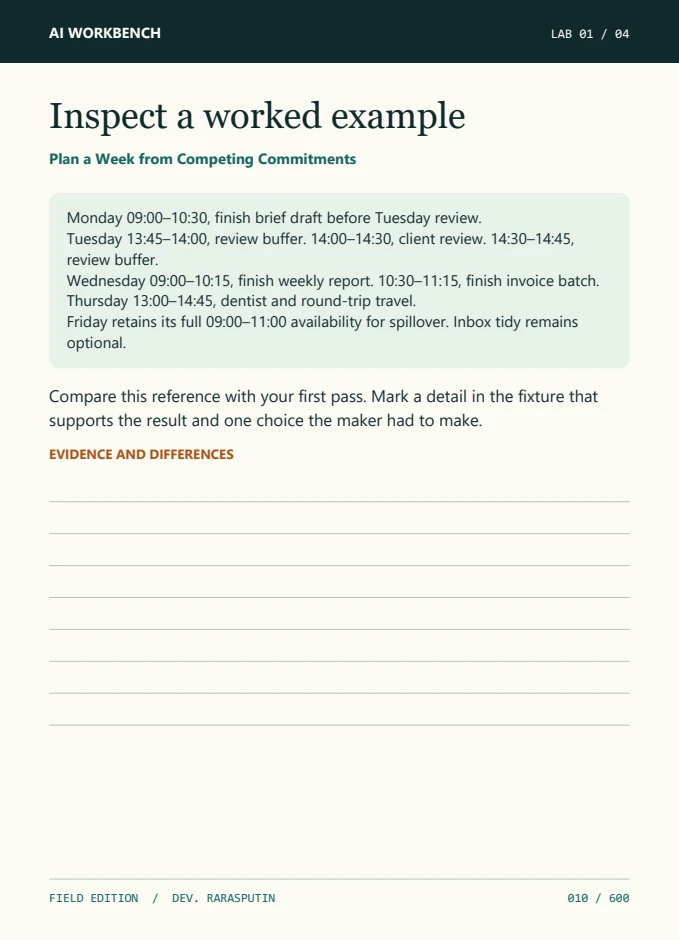
A useful weekly plan begins by distinguishing commitments, estimates, and preferences. A commitment has a real time boundary or dependency. An estimate is a guess about duration and can be revised after work begins. A preference helps place flexible work without creating a new obligation. ChatGPT or Claude can help lay these out, but each proposed block still needs to fit inside the actual availability. Ask for a compact constraint table before asking for a schedule so that you can catch forgotten travel time, optimistic task estimates, or work that should move to a later week. Use a separate list of options for overflow. When the first schedule looks tidy, simulate a common interruption and check which blocks can move without creating new conflicts.
Workbook pages 7–16
Look inside
Browse one preview from each track, or open the 12-page PDF sample for a closer look at the format and opening exercises.
Before you start
Start with the first track. It covers writing prompts, checking answers against sources, and comparing ChatGPT with Claude using the same exercise.
Use a chat assistant and a text editor for the prompt labs. Media labs can use your preferred image, video, or audio tool. The Python capstone runs offline and needs no API key. Some optional tools may require their own accounts.
It processes synthetic support tickets, checks draft replies against a local catalog, holds uncertain cases for review, and prevents repeated simulated dispatch.
You receive the 600-page digital PDF and a ZIP with the workbook, practice files, and offline Python capstone.
The complete workbook
Get all 60 labs and keep the practice files for your own projects.
Open the Gumroad listingUSD base price. Applicable tax is shown at checkout.